
 Ishtiga
Guide 10 of 15
Manage your plan and billing
Goal: understand what your trial includes, compare Toki and Saku, subscribe, and change or cancel later. Who: everyone can view. Only Owners and Admins can change the plan or payment details.
Who bills you
Important: organisations with a linked Shopify store can pay for Ishtiga only through Shopify's app billing.
If you signed up directly and later link a Shopify store, your plan moves to Shopify billing and your Paddle subscription is cancelled. See Step 4: Shopify stores below.
| How you use Ishtiga | Who bills you | Where you manage the plan |
|---|---|---|
| Your Shopify store is linked to Ishtiga | Shopify only. No Ishtiga charges are made through Paddle or any other provider. | Your Shopify admin: Apps → Ishtiga |
| You signed up directly with Ishtiga, with no Shopify store linked | Paddle | Settings → Plan & Billing |
If you use Shopify, follow Steps 1 to 3 and then Step 4: Shopify stores. The Paddle steps don't apply to you.
Step 1: Read your current allowance
Open Settings → Plan & Billing (or Choose a plan at the bottom of the sidebar during a trial).
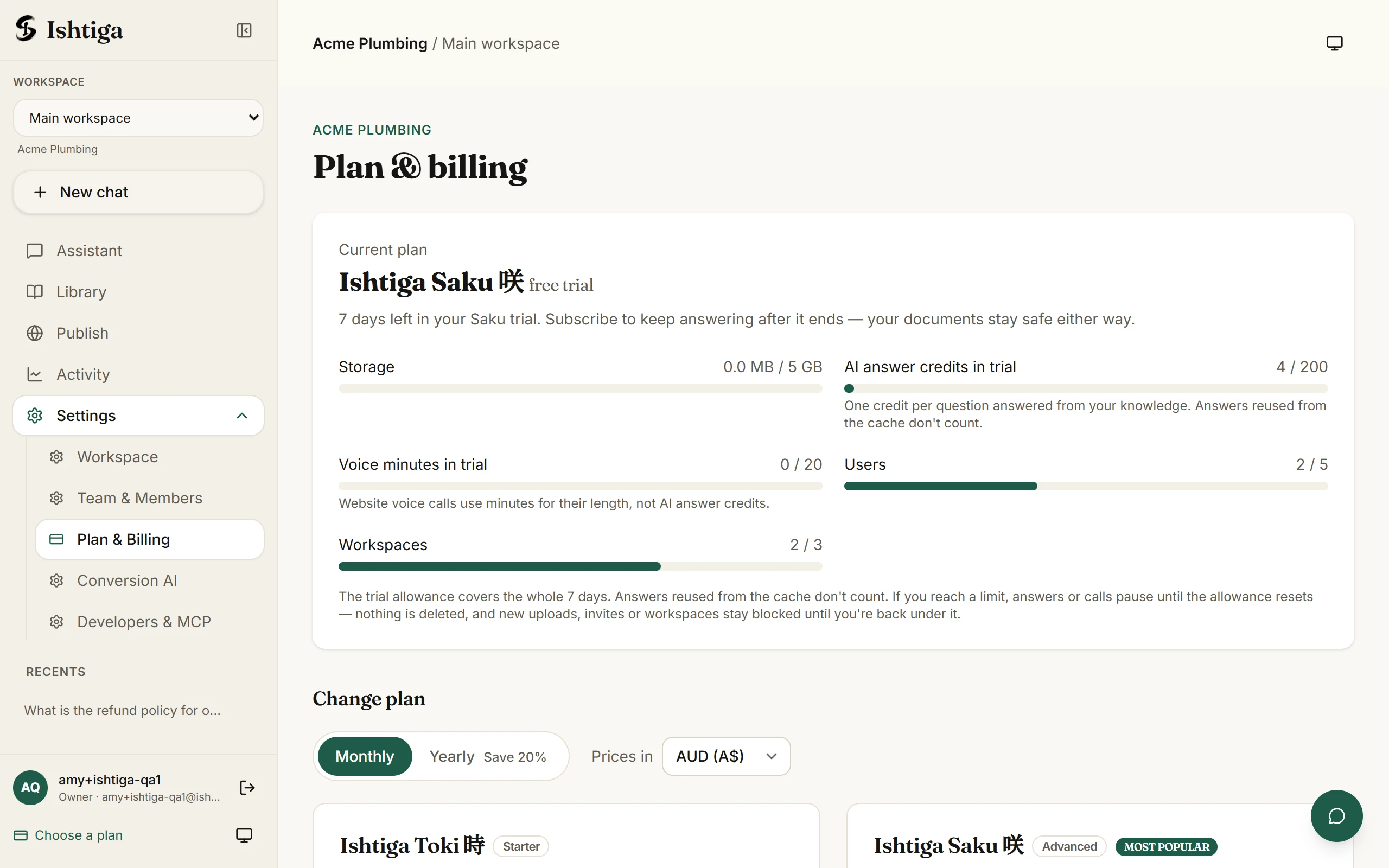
The Current plan card shows:
| Meter | Meaning |
|---|---|
| Storage | Indexed content across every workspace in the organisation |
| AI answer credits | One credit per fresh answer from the widget, Assistant, voice or API. Cached answers are free |
| Voice minutes | Length of website voice calls |
| Users | Accepted members plus pending invitations |
| Workspaces | Separate knowledge collections |
A trial lasts 7 days with no card, and each owner gets one. Its allowance covers the whole 7 days: 100 AI answer credits and 10 voice minutes on a Toki trial, 200 credits and 20 minutes on a Saku trial. On a paid plan it resets on your billing date every month, including on yearly billing. When a limit is reached, answers or calls pause until the reset or an upgrade; nothing is deleted.
Step 2: Compare the plans
Both plans have the same allowances wherever you pay.
Shopify stores: choose a plan in your Shopify admin, which shows the price and confirms the charge before you approve it.
Direct customers (no Shopify store linked): the Change plan section lists both plans with the Monthly / Yearly toggle (yearly saves 20%). Prices show in your local currency, which you can change with the Prices in selector, and are charged in that currency through Paddle. Every price excludes tax; Paddle adds any tax when you pay.
| Ishtiga Toki (Starter) | Ishtiga Saku (Advanced) | |
|---|---|---|
| AI answer credits per month | 2,000 | 10,000 |
| Voice minutes per month | 30 | 120 |
| Storage | 1 GB | 5 GB |
| Pages per website import | 40 | 125 |
| Workspaces / users | 1 / 2 | 3 / 5 |
| Website chat and voice receptionist | Yes | Yes |
| Team Assistant with deep research | Yes | |
| Automated lead capture, CSV export, lead webhooks | Yes | |
| API, MCP and AI assistant connections | Yes | |
| AI FAQ drafting and knowledge conflict audits | Yes | |
| Shopify store sync | Up to 40 products | Every published product |
| Automations (Google Calendar, workspace actions, editing handoff rules) | Yes |
The public pricing page shows the same figures.
Step 3: Switch the trial (optional)
While on a trial, Owners and Admins can choose Switch trial to Toki (or Saku) on the other plan's card. The end date stays the same, so you can try Saku's Assistant for a few days and drop back to Toki before deciding.
Step 4: Subscribe
Shopify stores
- In your Shopify admin, open Apps → Ishtiga. From Ishtiga, Plan & Billing also links there.
- Choose Toki or Saku and approve the charge in Shopify.
Shopify bills the plan and provides the invoices. To change or cancel, return to Shopify admin. Uninstalling the app there also ends the plan.
If you were paying through Paddle when you linked your store, that subscription is cancelled when you link, so it won't renew. Fees already paid are not refunded. Choose a plan in Shopify as soon as you link, because your Paddle plan stops applying at that point.
Direct customers (no Shopify store linked)
- Choose Monthly or Yearly.
- Choose Subscribe to Toki or Subscribe to Saku on the plan card. Paddle's checkout opens, pre-filled with your country.
- Complete payment and return to Ishtiga. The page updates once Paddle confirms it, usually within a minute.
Either way, your documents, settings and website verification carry over from the trial unchanged.
Step 5: Change, update or cancel later (direct customers)
Shopify stores do all of this in Shopify admin, as described in Step 4.
- Update card changes the saved payment method.
- Upgrade to Saku or Switch to Toki on the other card moves you up or down; the change and any pro-rated charge are confirmed in Paddle's checkout.
- Cancel subscription ends the plan at the close of the current billing period; the page shows the date. Fees already paid are not refunded.
- Past invoices and their PDFs are under Invoices.
What happens when a trial or subscription ends
Answers and calls pause immediately. Seven days later the content of every workspace is permanently deleted; Owners and Admins are emailed five days after the end with the exact date. Before then, use Settings → Workspace → Download data to export each workspace as JSON. Subscribing again within the seven days restores service with everything intact.
Next
If seats or workspaces are blocking an invitation, see guide 8. For how credits are spent, see the Usage tab in guide 7.